Why Did Linksys Smart WiFi Stop Working? The 2026 Firmware That Removed the Cloud, and Each Router's End-of-Support Date
TL;DR
- Linksys's 2026 firmware removes the Smart WiFi cloud services: remote access and sign-in through LinksysSmartWiFi.com stop, and you sign in at myrouter.local or 192.168.1.1 on your own network.
- 16 of the 26 Linksys routers safeuntil tracks got this firmware between April 7 and November 10, 2026. On those routers its number ends in 216877 or higher.
- The release notes of that firmware name no security fix for any of the 16 routers.
- 5 of the 16 got it after Linksys's end-of-support date, so a 2026 firmware date does not mean that security updates continue.
Linksys's 2026 firmware removes its Smart WiFi cloud services. Once a router has it, remote access and sign-in through LinksysSmartWiFi.com stop, and you manage the router from its local web page. Of the 26 Linksys routers safeuntil tracks, 16 got this firmware between April 7 and November 10, 2026. For 5 of them it came after Linksys's end-of-support date.
What stops working, and how you sign in now
Linksys's support article on its Smart WiFi cloud services says that it begins to end support for those services on March 26, 2026, and it lists the affected models. It gives no date for the end of the shutdown. For a router on the 2026 firmware, the article says:
- Remote access no longer works.
- Signing in from a desktop computer through LinksysSmartWiFi.com is no longer supported.
- You can no longer set up a router with the Linksys app, and new Linksys cloud accounts cannot be created.
- Signing in to the Linksys app can still work with the router password while your phone is on the router's WiFi, and if it fails, Linksys says to use a computer.
- The router itself keeps working.
To manage the router now, sign in on your own network:
- On a computer connected to the router, open myrouter.local in a browser. If it does not open, use https://192.168.1.1. If the browser shows a security message, Linksys's sign-in instructions say to choose to proceed.
- Sign in with the router password, not with the Linksys cloud account.
If you do not know the router password, the sign-in page of Velop, MX and MR routers has a Reset Password link. It asks for the recovery key printed on the bottom of the router. An EA or WRT router has to be reset and set up again.
How to tell whether your router has the 2026 firmware
After you sign in, click Connectivity. On the Basic tab, click Details under Firmware Update. The current version is shown there, for example 1.0.13.216903.
On the Linksys routers safeuntil tracks, a firmware number that ends in 216877 or higher is the 2026 firmware without the cloud services. I read the release notes of 25 of the 26 tracked routers on Linksys's download pages on November 17, 2026, and the page of the E8450 did not open that day. In those notes, every firmware dated 2026 ends in a number from 216877 to 216960, and the highest number before 2026 is 216771. The first with the change is 2.1.20.216877 for the Velop WHW03 (v2), dated April 7, 2026. Its notes read "Removed remote Linksys Smart WIFI services" and "Added support for local login".
| Part | In 1.0.13.216903 | What it is |
|---|---|---|
| First digit | 1 | Hardware version of the router |
| Next two numbers | 0.13 | Release line, which can stay the same when new firmware comes out |
| Last six digits | 216903 | Build number, which changes with every firmware |
So the last six digits are the part to compare with 216877. The MX4200 (v1) went from 1.0.13.216602 in June 2025 to 1.0.13.216903 in May 2026, and only the last six digits changed.
Linksys's pages and release notes do not explain the parts, so the table is my reading of the numbers. Five download pages list more than one hardware version, and on each the firmware for version 2 starts with 2 and the firmware for version 1 starts with 1.
Four other tracked routers, the E5600, E7350, E9450 and WRT32X, use other numbering, for example 1.1.0.26 and 1.0.180404.58, so this check does not apply to them.
Which routers got it, and when
All 16 tracked routers on Linksys's list got the 2026 firmware. The release notes of each one list the removal of the cloud or remote services. Each model name links to its safeuntil page.
| Router | Newest firmware | Released | End of support |
|---|---|---|---|
| Velop WHW03 (v1) | 1.1.19.216893 | May 6, 2026 | Nov 4, 2028 |
| Velop WHW03 (v2) | 2.1.20.216892 | Apr 25, 2026 | Nov 4, 2028 |
| Velop MX4200 (v1) | 1.0.13.216903 | May 21, 2026 | Dec 11, 2029 |
| Velop MX4200 (v2) | 2.0.7.216903 | May 21, 2026 | Dec 11, 2029 |
| Velop MX8500 | 1.0.12.216903 | May 28, 2026 | Dec 11, 2029 |
| Velop MX5500 | 1.1.7.216940 | Jul 14, 2026 | Dec 11, 2029 |
| Velop MX5300 | 1.1.12.216960 | Oct 26, 2026 | Nov 4, 2028 |
| MR5500 | 1.1.4.216940 | Aug 11, 2026 | Dec 11, 2029 |
| MR6350 | 1.1.3.216943 | Aug 24, 2026 | Dec 9, 2028 |
| MR7350 | 1.1.7.216943 | Aug 2026 | Dec 11, 2029 |
| MR7500 | 1.1.12.216943 | Aug 24, 2026 | Dec 11, 2029 |
| EA7450 | 1.0.4.216940 | Aug 6, 2026 | May 15, 2025 |
| EA7500 (v2) | 2.0.9.216940 | Jul 16, 2026 | Aug 9, 2025 |
| EA7500 (v3) | 3.0.1.216940 | Nov 10, 2026 | Aug 9, 2025 |
| WRT1900ACS (v1) | 1.0.4.216955 | Oct 13, 2026 | Mar 11, 2026 |
| WRT1900ACS (v2) | 2.0.4.216955 | Oct 15, 2026 | Mar 11, 2026 |
Linksys gives the MR7350 release as August 2026 with no day.
The end-of-support date in the table is the one Linksys gives for the model's main US SKU. A SKU is the item number of one sales version of a model, and other SKUs can differ. The US SKU of the Velop MX8500 is supported until December 11, 2029. Eight single-unit SKUs for other regions, from MX8501-AH to MX8501-UK, ended on November 29, 2023. The chart in the next section counts each router by its main US SKU.
The other 10 tracked routers are not on Linksys's list. Linksys's article says that a Smart WiFi router with a Linksys cloud account is still affected once the cloud services end, on the list or not. Nine of the 10 last got firmware between October 2017 and October 2022, and the tenth is the E8450.
Does the 2026 firmware fix security problems?
 (open full-size image)
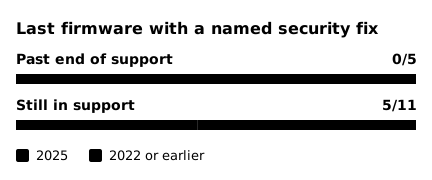
For five routers, the release notes last named a security fix in 2025: in June for the MX4200 v1 and v2, the MX5500 and the MR7500, and in September for the MR6350. For the other 11 it was 2022 or earlier: all 5 that are past their end-of-support date, and 6 that are still in support. For the WRT1900ACS v1 and v2 and the EA7500 v2 it was 2018.
The notes of the 2026 firmware name no security fix for any of the 16 routers. They list the removed cloud services and the local login, and some add other fixes and features. Release notes can leave a fix out, so this shows what Linksys wrote, not everything that changed.
5 of the 16 routers got the 2026 firmware after their end-of-support date: the EA7450, the EA7500 v2 and v3, and the WRT1900ACS v1 and v2. For these five, the date had passed for every SKU that Linksys lists.
Linksys's Product End of Life page says that after the end-of-support date it no longer provides software updates or security updates. A 2026 date on the firmware therefore does not show that a router still gets security fixes. How long routers get firmware updates compares Linksys's end dates with those of other makers.
Find the end-of-support date of your own router
- Read the model number on the product label. The hardware version is next to it, and a label with no version means version 1.
- Open the Linksys Product End of Life page and enter the model number, or the SKU if you know it.
- The page has a row for each SKU with its region. Read the End of Support Date in the row of your SKU or your region.
If that date has passed, the router still runs, but plan the replacement. If the date is still ahead, Linksys lists major security updates as available until then. Leave Automatic checked under Firmware Update, and keep the router password where you can find it.
Sources
Linksys gives its dates with no time zone, and this post repeats them as written.
- Linksys, Linksys Smart WiFi cloud services: https://support.linksys.com/kb/article/9634-en/
- Linksys, Linksys Product End of Life: https://www.linksys.com/pages/linksys-product-end-of-life
- Linksys, download pages and release notes of the routers named in this post, for example the MX4200, the EA7500 and the WRT1900ACS: https://support.linksys.com/kb/article/112-en/, https://support.linksys.com/kb/article/559-en/, https://support.linksys.com/kb/article/597-en/
- Linksys, Checking the firmware version of your router using the web interface: https://support.linksys.com/kb/article/103-en/
- Linksys, How to log in to the Linksys Mesh router's web interface: https://support.linksys.com/kb/article/107-en/