Same Router Name, Different Hardware Version: Firmware for v1, v2 and v3 Can Be Years Apart
TL;DR
- A router's hardware version (v1, v2, v3) is on its label, and each version has its own firmware list on the download page.
- safeuntil tracks 19 TP-Link, Linksys and Netgear router models in two or more hardware versions. In 6 of them, the versions' newest firmware is more than a year apart (October 29, 2026).
- A higher version number is not always updated longer: the Archer C7 v4 got its newest firmware in March 2022, the v2 in April 2026.
- Read the version on the label, then check the newest firmware on the download page for that exact version.
One router model name can cover several hardware versions, and each version has its own firmware list. safeuntil tracks 19 TP-Link, Linksys and Netgear router models in two or more hardware versions, and in 6 of them the versions' newest firmware is more than a year apart. In 3 of those 6, the version with the higher number has the older firmware. So check the firmware for your exact version, not for the model name. The dates come from the makers' download pages, read on October 29, 2026.
What a hardware version is
Makers sometimes change the parts inside a router and keep its name. TP-Link calls the hardware version the physical revision of the device, such as V1 or V2, and prints it on the label on the bottom. TP-Link and Netgear both say that a label with no version means v1.
Each hardware version has its own firmware list. On the Linksys download page for the EA7500, each version has a warning such as "The EA7500 v1 firmware is not compatible with the EA7500 v2 or EA7500 v3." So when Linksys posts new firmware for the v2, a v1 or v3 router gets nothing from it.
How far apart the versions' firmware is
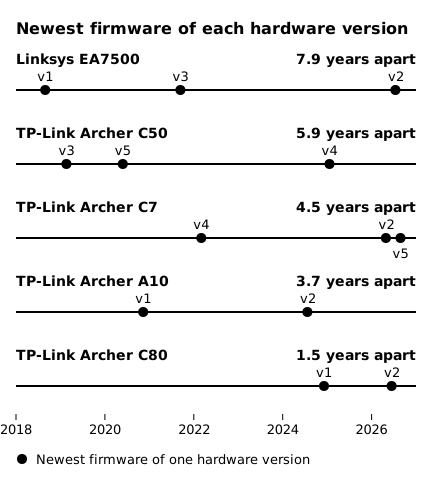
For 18 of the 19 models, the makers' pages give a release date for the newest firmware of every tracked version. Netgear gives no release date for the newest RAX40 v1 firmware (1.0.6.106). But Netgear's security advisory of April 15, 2024 already lists it, so it was out by then. The v2's newest firmware came out on August 10, 2026, so the two versions' newest firmware is at least 2.3 years apart. The chart shows the other 5 models whose versions' newest firmware is more than a year apart.
 (open full-size image)
A higher version number is not always updated longer. The Archer C7 v4 got its newest firmware on March 4, 2022. The v2 got new firmware on April 29, 2026, with the note "Improved overall security", and the v5 on August 27, 2026. TP-Link's US list says that sales of the Archer C7 v2 ended by January 2019, more than seven years before that firmware. On the Linksys EA7500, the v3 got its newest firmware on September 13, 2021, and the v2 on July 16, 2026.
Most models do not split this far. In 9 of the 18, the newest firmware of every tracked version came out within 90 days of the others. The Deco M5 v2 and v3, for example, both got firmware 1.9.5 on July 28, 2026.
How to find your version and its newest firmware
- Turn the router over and find the model and the version on the label. No version means v1.
- Open the maker's download page for the model and pick your hardware version.
- Note the date of the newest firmware for that version, not for the model in general.
- Sign in to the router's admin page, compare its firmware version with that newest one, and install the newer one if there is one.
Firmware posted for another version does not reach your router. If your version's newest firmware is years older than the others', look it up on the maker's end-of-life list. On Netgear's list, the end-of-service date is when updates end. On Linksys's list, updates end on the End of Support Date, not the End of Life Date. On TP-Link's US list, the EOS Date is when sales ended, and TP-Link says maintenance usually ends 3 years after that. Once updates for your version have ended, plan a replacement.
FAQ
What do versions like 1.6 or 1.26 on a TP-Link label mean? TP-Link's download pages say that V1.6 and V1.8 are the same as V1.0, and that V1.26 and V1.28 are the same as V1.20. So a router whose label says 1.6 takes the V1 firmware.
Sources
Dates are as each maker's page shows them, with no time zone.
- TP-Link, download pages of the Archer C7 (v2, v4, v5), Archer C50, Archer A10, Archer C80 and Deco M5 by hardware version (US pages, and the international pages for the Archer C50 v3 and v4), for example: https://www.tp-link.com/us/support/download/archer-c7/v2/
- TP-Link, How to Find the Firmware and Hardware Version on TP-Link Device (updated June 24, 2026): https://www.tp-link.com/us/support/faq/315/
- TP-Link, End-of-Life Policy: https://privacy.tp-link.com/web/website/policy
- TP-Link, End of Life Products (updated September 21, 2026) and its US EOS List for Home Network V9: https://www.tp-link.com/us/support/faq/3562/, https://static.tp-link.com/upload/manual/2026/202609/20260921/US%20EOS_List_Home%20-%20V9.pdf
- Linksys, EA7500 firmware: https://support.linksys.com/kb/article/559-en/
- Linksys, Product End of Life: https://www.linksys.com/pages/linksys-product-end-of-life
- Netgear, End of Service Products: https://www.netgear.com/about/eos/
- Netgear, Security Advisory for Authentication Bypass on Some Routers, PSV-2023-0166: https://kb.netgear.com/000066096/Security-Advisory-for-Authentication-Bypass-on-Some-Routers-PSV-2023-0166
- Netgear, RAX40v2 Firmware Version 1.0.18.146: https://kb.netgear.com/000070886/RAX40v2-Firmware-Version-1-0-18-146