How Long Do Routers Get Firmware Updates? End of Support at Netgear, TP-Link, ASUS and Linksys
TL;DR
- A router usually has no update end date until its maker discontinues it.
- Netgear ends updates 3 years after it discontinues a router, and TP-Link usually does the same.
- If a router has no end date and its newest firmware is more than 18 months old, its updates may have ended.
- Your firmware version is in the router's admin page or app: Advanced, Administration, Firmware Update on Netgear; Administration, Firmware Upgrade on ASUS.
A router usually has no update end date until its maker discontinues it. Netgear ends updates three years after it discontinues a router, and TP-Link usually does the same. ipTIME promises security updates for three years after it discontinues a model. It lists which models are discontinued, but not when. So for most discontinued ipTIME routers, there is no end date you can work out. Of the 332 routers safeuntil tracked on October 26, 2026, 226 had neither an end date nor an end-of-life mark from their maker. For those, check when the newest firmware came out.
How many routers have an end date
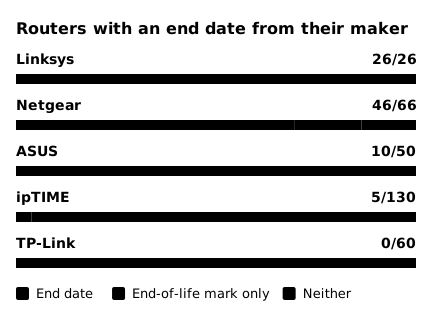
I checked what each maker publishes for the 332 routers safeuntil tracks from Netgear, TP-Link, ASUS, Linksys and ipTIME, as of October 26, 2026. "End date" means the maker's own documents give the date updates end. "End-of-life mark only" means the maker says updates have ended, but not since when.
 (open full-size image)
All 26 Linksys routers safeuntil tracks have an end date, and none of the 60 TP-Link routers does. Three TP-Link routers have only an end-of-life mark. The Linksys routers safeuntil tracks are all discontinued already, so Linksys's end-of-life list gives each a date. TP-Link's US list gives only the dates it discontinues models, and its end-of-life policy says updates "usually" end three years later. Adding three years gives a guess. But "usually" means it can differ by model, and it is not a date TP-Link has stated, so I did not count it. ASUS puts no dates on its end-of-life list. Instead, its download page marks one firmware release with a note that the model "will no longer be updated". I counted that release date as the end date ASUS gave, and that is where the ten ASUS dates come from.
How each maker sets the end date
| Maker | Updates end | Where the date is |
|---|---|---|
| Netgear | 3 years after discontinuation | End-of-life list, per item number |
| TP-Link | Usually 3 years after discontinuation | US list gives discontinuation dates only |
| ASUS | When a discontinued model joins its end-of-life list | Release date of the firmware with the end-of-life note |
| Linksys | Mostly 5 years after discontinuation, some 18 months | End-of-life list, per item number |
| ipTIME | 3 years after discontinuation | Some models only: an end-of-life note in the release notes |
- Netgear: find the row with your full item number (such as RBK752-100NAS), not just the model name. In Netgear's end-of-life list, all nine Orbi RBK752 item numbers are discontinued, so each has an end date, from December 1, 2025 to October 1, 2027. A model still on sale has "at least three years remaining" and no end date. For 11 of the 46 Netgear models with an end date in the chart, only some item numbers have one; the others are still on sale.
- TP-Link: one model can have several discontinuation dates by hardware version. The Archer AX21 v3.6 was discontinued on November 30, 2024, and v4.6 and v5.6 will be discontinued on February 14, 2027 (US list). The hardware version is on the label under the router.
- ASUS: the RT-AX88U's April 17, 2026 firmware carries the end-of-life note, so I counted that day as its end date. Yet ASUS posted another release on October 22 (ASUS). Firmware can still come out after the end date ASUS gave. ASUS states per-model support periods only on its pages for products sold in the UK, Australia and Singapore. These periods apply only to products sold there, so the chart above does not count them.
- Linksys: every item number on its end-of-life list has an end date. Updates for the E8450 (USA) ended on June 11, 2026, and for the European E8450-EU on March 21, 2024.
- ipTIME: on July 2, 2026, Korea's ipTIME promised 3 years of security updates after it discontinues a model. Its discontinued products list names the models but gives no dates. Storage can end updates sooner, whatever the promise. The release notes of 16.00.0 (September 16, 2026) carry an end-of-life note for five models: no updates from this version on, because of their storage limit (4MB of flash). I counted that day as their end date.
How to check your router's firmware version
- Netgear: go to routerlogin.net, then Advanced (Settings on some models), Administration, Firmware Update or Router Update (Netgear). In the Nighthawk app, tap the image of your router, then Check for Updates.
- TP-Link: sign in to the router's web management page. In the build number, the digits are the release date: 20140924 is September 24, 2014 (TP-Link).
- ASUS: sign in at asusrouter.com, then Administration, Firmware Upgrade (ASUS).
- Linksys: in the Linksys app, open the menu, then Network Administration, Nodes, and tap each node (Linksys).
Then compare your version with the newest one on your model's download page. Make sure the page is for your hardware version: at Netgear, TP-Link and Linksys, no version on the label means v1.
When there is no end date
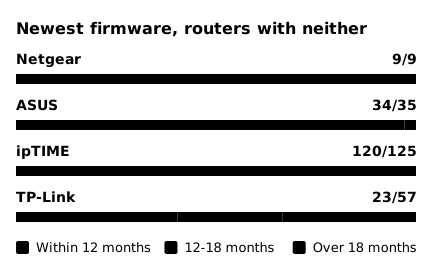
Look at the date of the newest firmware on the maker's download page. A model that got firmware in the past 12 months has had updates until recently, whatever its age. One with no new firmware for more than 18 months, and on no end-of-life list, may have stopped getting updates without notice. Between 12 and 18 months, watch for the next release. For a router whose updates have ended, Netgear and TP-Link both advise a new one.
 (open full-size image)
ipTIME ships one release to most of its line at once: 16.00.4 of October 13 alone reached 113 of the 130 ipTIME routers safeuntil tracks (which ipTIME models stopped at which version). 120 of the 125 ipTIME routers with neither got new firmware in the past 12 months. ipTIME's own status page also lists its older discontinued routers, and almost none launched in 2016 or earlier got firmware in that time (ipTIME routers by launch year). Across all 226 routers with neither, 186 got new firmware in that time. 19 of the 57 TP-Link routers with neither have had no new firmware for more than 18 months.
The 18 months is safeuntil's own rule of thumb, not a maker rule. For a maker like ipTIME, whose discontinuation dates are unknown, safeuntil cannot tell when the 3-year promise ends, so it looks only at the newest firmware. A router with neither an end date nor an end-of-life mark is marked "Likely ended (estimate)" once more than 18 months pass after its newest firmware. For example, the TP-Link Archer AX80 v1 has no end date, and its newest firmware came out on August 18, 2026. With no new firmware by February 2028, the safeuntil page will mark it "Likely ended (estimate)".
FAQ
Does the end of updates change the warranty? It depends on the maker. TP-Link says the end of updates does not change the hardware warranty. Linksys offers no warranty support, hardware repairs or returns after a model's end date.
My router came from my internet provider. Do these dates apply? Not always. Netgear's policy says products sold through carriers or network operators may be supported by them and are not governed by its policy. Ask your provider how it updates the router it supplied.
Sources
- Netgear, End of Service Policy (2025) and End of Service Products (September 2026 list): https://downloads1.netgear.com/files/netgear/pdfs/EOS-Policy-2025.pdf, https://www.netgear.com/about/eos/
- Netgear, How do I update the firmware on my NETGEAR router?: https://kb.netgear.com/000058238/How-do-I-update-the-firmware-on-my-NETGEAR-router
- TP-Link, End-of-Life Policy, End of Life Products (updated September 21, 2026) and US EOS List for Home Network V9: https://privacy.tp-link.com/web/website/policy, https://www.tp-link.com/us/support/faq/3562/, https://static.tp-link.com/upload/manual/2026/202609/20260921/US%20EOS_List_Home%20-%20V9.pdf
- TP-Link, How to Find the Firmware and Hardware Version on TP-Link Device: https://www.tp-link.com/us/support/faq/315/
- ASUS, End-of-Life Product List and RT-AX88U firmware: https://www.asus.com/event/network/eol-product/, https://www.asus.com/us/supportonly/rt-ax88u/helpdesk_bios/
- ASUS, Security Update Support (UK and Australia, last updated 2026-10-05) and Duration of Security Update Support (Singapore, last updated 2026/09/03): https://www.asus.com/event/network/security_update_support/, https://www.asus.com/support/faq/1051375/
- ASUS, How to update the firmware of your router (WebGUI): https://www.asus.com/support/faq/1008000/
- Linksys, Product End of Life: https://www.linksys.com/pages/linksys-product-end-of-life
- Linksys, Checking the firmware version of your Linksys Mesh network: https://support.linksys.com/kb/article/104/
- ipTIME, security update support policy (July 2, 2026), firmware 16.00.0 (September 16, 2026) and 16.00.4 (October 13, 2026), discontinued products: https://iptime.com/support/downloads/27415, https://iptime.com/support/downloads/27529, https://iptime.com/support/downloads/27618, https://iptime.com/products?cat=discontinued