PHP2Shell: Which PHP Versions Got the Fix, and How Long They Stay Supported
TL;DR
- PHP2Shell (CVE-2026-109618, CVE-2026-109619) was fixed on October 21, 2026 (UTC) in PHP 8.5.12, 8.4.27, 8.3.36 and 8.2.35; PHP 8.1 and older get no official release from the PHP project.
- From W3Techs' October 23 survey, about 48.3% of PHP websites run a branch with no official fix, and another 18.0% run 8.2, which was fixed but loses security support on December 31, 2026.
- If you run a site, bring PHP 8.2 to 8.5 up to 8.2.35, 8.3.36, 8.4.27 or 8.5.12 or later and move 8.1 and older to a supported branch, then restart PHP, check your logs from October 17 on and change the server's passwords and keys.
- If you only use websites, there is nothing to install on your phone or computer; if you have a NAS, check its maker's advisory.
The two PHP flaws known as PHP2Shell were fixed on October 21, 2026 (early afternoon UTC), in PHP 8.5.12, 8.4.27, 8.3.36 and 8.2.35, and PHP 8.1 and every older branch got no official release. The fixed branches keep security support until December 31 of 2026 (8.2), 2027 (8.3), 2028 (8.4) and 2029 (8.5). Working from W3Techs' October 23 survey, about 48% of websites that run PHP are on a branch with no official fix.
The two flaws and attacks so far
The php.net advisory says both flaws (CVE-2026-109618 and CVE-2026-109619) can let an attacker run their own code on the server without logging in (unauthenticated remote code execution). php.net's advance notice rated both 9.2 out of 10 for severity (CVSS v4.0), and its release notes are blunt: "There are no complete mitigations, updating is the only safe choice." PHP2Shell is the industry name; php.net's notices do not use it, so search there by the CVE numbers.
Reports differ on how far attacks have gone. watchTowr said on October 21 (UTC), in a post updated October 22, that its honeypot network (decoy servers run to attract attacks) saw both flaws exploited. CISA said in its alert, dated October 21 (US time), that it had not observed successful exploitation in the wild as of publication. Amazon said in an October 21 blog post that its MadPot honeypots saw an exploitation attempt on October 17, four days before public disclosure, and that broad attempts to exploit PHP2Shell are now under way in the wild.
Fix status and support end date by branch
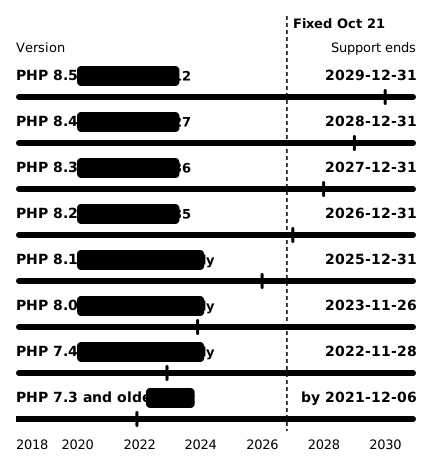
The chart puts each branch's fix and the end of its security support on one timeline. Each bar runs from the branch's release (7.3 and older from the left edge) to the dashed line at the October 21 fix. It is violet while the branch had security support and red after support ended, so 8.1 and older were already out of support. The short upright mark is the day security support ends, and the gray track after the dashed line is support still to come.
 (open full-size image)
The "source patch" for 8.1, 8.0 and 7.4 is not a release you install. Given the severity, the PHP security team published minimal source backports for people who build PHP themselves or have no long-term support vendor. If PHP comes from your host or a Linux distribution package, you will not apply this code yourself; check for your host's or distribution's update instead.
How many sites sit on a branch with no official fix
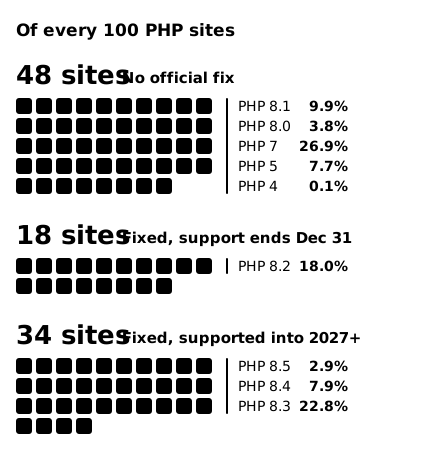
W3Techs surveys which server language and version websites use and updates it daily. On October 23, 69.3% of websites whose server-side language it knows used PHP. Out of every 100 of those PHP sites, by PHP2Shell fix status:
 (open full-size image)
Close to one PHP site in two is on a branch with no official fix, and nearly one in five is on 8.2, whose support ends in two months. Check which branch your site runs.
A version number alone does not prove a hole, though. Linux distributions and device makers can ship backported fixes without changing the PHP version: Synology's October 22 advisory, for example, includes fixed packages for PHP 7.4, 8.0 and 8.1. So if your package says 8.1 or older, check its changelog before drawing a conclusion (step 3 below).
If you run a site or pay for hosting
1. Find out which PHP version your site runs.
- WordPress: the admin dashboard shows it under Tools → Site Health → Info → Server.
- Hosting control panel: on cPanel hosting, MultiPHP Manager lists the PHP version of each domain. If you cannot find it, ask your host.
- With shell access to the server, run
php -v. The command-line PHP can differ from the one serving your site, so also check the version your web server uses (PHP-FPM, for example).
2. If your host or a device vendor manages PHP for you, patching, the step 4 setting and restarting are theirs to do. Ask them: "Which PHP version does my site run, and is the October 21 PHP2Shell update (CVE-2026-109618, CVE-2026-109619) applied?" On 8.1 or older, also ask whether you can switch to a newer branch. Passwords you manage yourself, such as your site's admin password, are still yours to change (step 6).
3. Act on the version you found.
| Your version | What to do |
|---|---|
| 8.3, 8.4, 8.5 | Update to 8.3.36, 8.4.27, 8.5.12 or later |
| 8.2 | Update to 8.2.35 or later, and plan the move to 8.3 or newer before support ends on December 31 |
| 8.1 or older | Move to a supported branch (8.2 or newer, preferably 8.3 or newer); until then, apply your distribution's or long-term support vendor's backport |
For a distribution package, check that its changelog lists both CVEs; on Debian or Ubuntu, for example, run apt changelog <package name> | grep -E 'CVE-2026-10961[89]'.
CISA goes further: organizations that cannot update right away, or still run 8.1 or older, should take PHP-based systems offline until they can be patched or updated.
4. Turn off session upload progress until the next regular PHP bugfix release. php.net's October 23 notice asks for this to close an unlikely path that needs an unusual setup (CVE-2026-115560). As the October 21 advisory says, set it in php.ini, an FPM pool or server configuration that applies before the request is parsed, not with ini_set() or .user.ini:
session.upload_progress.enabled = 0
5. Restart every service that runs PHP. Korea's KISA notes that until you do, the old version keeps running from memory. In containers, deploy a rebuilt image. If you already see signs of a break-in, save the logs and the list of running processes first (step 6).
6. Check your logs from October 17 on, and change the server's secrets. KISA says to review at least everything since October 20, the date it gives for when details of the flaws leaked, and earlier logs if possible. Amazon saw an exploitation attempt on October 17 and warns not to treat the disclosure date as the earliest date of exploitation, so if your logs go back that far, start there. KISA lists what to look for:
- unusually large requests to PHP pages followed by HTTP 500 errors
- PHP restarting, crashing or running out of memory for no clear reason
- the web server starting a shell or a download tool
- new or changed PHP files in web, upload or temp folders
- scripts quietly added to your pages
- connections from the server to unknown addresses
The flaws can also leak passwords and API keys held in server memory, so even with clean logs, KISA says to change the database password, API keys and admin passwords on any server that was reachable from the internet before you updated. If you find signs of a break-in, cut off outside access from then on but do not shut down or restart the server until you have saved the logs and the list of running processes.
Don't test your server with exploit code from the internet. KISA warns that many circulating proofs of concept are fakes hiding malware, and says to judge exposure from your version and your logs.
If you only use websites
PHP runs on web servers, so there is nothing to install on your phone or computer.
You cannot see from outside whether a service you use was affected; a breach notice from that company is how you would find out. If a notice does reach you later, look the company up in the breach check: for a breach on its list, it shows what was exposed and what to do first.
If you have a NAS at home
Check your maker's security advisory and update your NAS's PHP packages or firmware; the NAS post covers what to do on Synology, ASUSTOR and QNAP. If your NAS serves a website, the section for people who run a site applies too.
Sources
Dates are as each source states them: php.net and watchTowr in UTC, KISA in Korea time (KST), Synology in UTC+8, CISA in US time (the publication date in the alert's address; revised October 23), W3Techs as the date on its survey pages, Amazon as the date on its blog post (US Pacific time). The fixed releases went public around 13:00 to 14:00 UTC on October 21 (php.net website repository, Amazon); the times in php.net's news feed (around 00:00 UTC) are when the announcements were written.
- php.net, October 21, 2026 security releases and advisory: https://www.php.net/archive/2026.php
- php.net website repository, the commit adding the advisory (committed 12:59 UTC, October 21, 2026): https://github.com/php/web-php/commit/b9c4b55acccbfa036e55fab1537596d83c7d43ca
- Amazon Threat Intelligence, PHP2Shell exploitation prior to public disclosure in MadPot (October 21, 2026): https://aws.amazon.com/blogs/security/amazon-threat-intelligence-identifies-php2shell-exploitation-prior-to-public-disclosure-in-madpot/
- php.net, supported versions: https://www.php.net/supported-versions.php
- php.net, unsupported branches: https://www.php.net/eol.php
- KISA (Korea Internet & Security Agency), PHP2Shell response guide for organizations (October 22, 2026, in Korean): https://www.boho.or.kr/kr/bbs/view.do?bbsId=B0000133&menuNo=205020&nttId=72230
- CISA, "Critical Vulnerabilities in PHP Require Immediate Patching" (October 21, 2026, revised October 23): https://www.cisa.gov/news-events/alerts/2026/10/21/critical-vulnerabilities-php-require-immediate-patching
- watchTowr, PHP2Shell exploitation (published October 21, updated October 22, 2026): https://watchtowr.com/intelligence/php-remote-code-execution-php2shell/
- Synology, Synology-SA-26:14 (updated October 22, 2026): https://www.synology.com/en-global/security/advisory/Synology_SA_26_14
- W3Techs, PHP version statistics (October 23, 2026): https://w3techs.com/technologies/details/pl-php, https://w3techs.com/technologies/details/pl-php/8
- WordPress, Site Health screen: https://wordpress.org/documentation/article/site-health-screen/
- cPanel, MultiPHP Manager: https://docs.cpanel.net/cpanel/software/multiphp-manager-for-cpanel/