PHP2Shell and your NAS: what Synology, QNAP and ASUSTOR owners should do
TL;DR
- Synology shipped fixed PHP 7.4 to 8.4 packages, Mail Station and Synology Calendar on October 22, so update them in Package Center and retire the PHP 7.3 package, which gets no fix.
- ASUSTOR shipped fixed PHP 8.3 and 8.4 on October 23 and pulled PHP 7, 7.3, 7.4 and 8.1 from App Central, so keep only PHP 8.3 or later.
- On QNAP, install the QTS, QuTS hero or QuTScloud fix listed on October 24, and for its apps and products with no fix yet, turn off port forwarding and UPnP and connect from outside only by VPN.
- PHP inside containers you run on a NAS is not fixed by the maker's updates, so check that image for its own update.
Update your NAS: Synology, ASUSTOR and QNAP had all shipped fixes by October 24, though some QNAP apps and products are still being fixed. The two PHP flaws known as PHP2Shell (CVE-2026-109618 and CVE-2026-109619) are not only a web-host problem, because some NAS devices run their admin pages or apps on PHP too. Read the section for your NAS maker.
Why a PHP flaw reaches a NAS
The admin page you open in a browser, and the photo, mail and calendar apps, are small websites living in your home. Each time you click, the NAS builds the next page and sends it back, and PHP is one of the languages doing that work. QNAP's advisory says PHP is used in the web components of its operating systems and several of its apps.
Think of PHP as a kitchen that takes orders and plates up pages. The first flaw piles on work until the kitchen runs out of room, so cleanup starts on an order that was never fully set up. The second leaves a note pointing to the last order's spot after that spot has been cleared, and the next order reads the note by mistake. Either way, an attacker who can reach that PHP can run their own code on the NAS before logging in.
That makes a NAS reachable straight from the internet the riskiest case. QNAP says that until fixes ship, keeping the device off the internet is the most effective protection.
When each maker shipped fixes
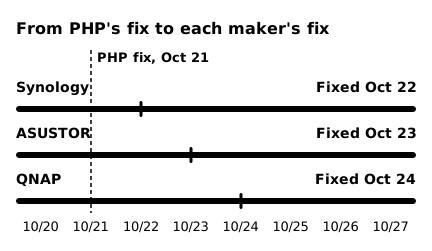
All three makers published advisories on October 22, and fixed versions followed on the 22nd (Synology), 23rd (ASUSTOR) and 24th (QNAP). In the chart, each bar runs from PHP's fix to the day the maker's advisory first listed fixed versions. For QNAP, that is the day it listed fixed QTS, QuTS hero and QuTScloud versions; some of its other products are still being fixed.
 (open full-size image)
Their routes differed. With its advisory, Synology fixed every package except PHP 7.3, including PHP 7.4 to 8.1 packages for which the PHP project published only source backports. ASUSTOR went the other way: it pulled the end-of-life PHP versions from App Central and told owners to use only PHP 8.3 or later.
If you have a Synology NAS
Synology's October 22 advisory lists the PHP 7.3 to 8.4 packages for DSM, Mail Station and Synology Calendar as affected. It says the PHP built into DSM is not exposed to external attack surfaces and rates the risk of exploitation as very low. So check whether you installed any of these packages.
Open Package Center and click Installed on the left panel to see available updates, then click Update or Update All (Synology help). Afterwards, check that each version is at least the one below.
| Package | Fixed version |
|---|---|
| PHP 8.4 | 8.4.27-0051 or later |
| PHP 8.3 | 8.3.36-0051 or later |
| PHP 8.2 | 8.2.35-0171 or later |
| PHP 8.1 | 8.1.34-0120 or later |
| PHP 8.0 | 8.0.30-0122 or later |
| PHP 7.4 | 7.4.33-0131 or later |
| PHP 7.3 | no fix (end of life) |
| Mail Station | 30000002.3.19-20333 or later |
| Synology Calendar | 3.0.4-21435 or later |
The PHP 7.3 package has reached end of life and will not be fixed. Move any site or app that uses it to a newer PHP package, and remove it if nothing does.
If you have an ASUSTOR NAS
ASUSTOR published its advisory on October 22 and added fixed versions on October 23. It says products with PHP installed on ADM are affected, and that because the PHP Group only provides security patches for 8.2 and later, PHP 7, 7.3, 7.4 and 8.1 have been removed from App Central.
| ADM version | What to do |
|---|---|
| 5.0, 5.1 | Update PHP 8.3 to 8.3.36.r124 or later and PHP 8.4 to 8.4.27.r106 or later |
| 4.1, 4.2, 4.3 | Update PHP 8.3 to 8.3.36.r3 or later |
| 3.5, 4.0 | Turn off the web server in Web Center and remove PHP 7, 7.3, 7.4 and 8.1 |
In its mitigation, ASUSTOR also advises turning off the web server in Web Center, removing end-of-life PHP and using only PHP 8.3 or later.
If you have a QNAP NAS
QNAP's October 22 advisory lists these products as affected, and its October 24 revision (V1.1) added fixed versions for QTS, QuTS hero and QuTScloud. QNAP says it has not received reports of exploitation targeting its products.
| Product | Fixed version |
|---|---|
| QTS 6.1.0 | 6.1.0.3656 build 20261023 |
| QTS 5.2.11 and earlier | 5.2.11.3661 build 20261023 |
| QuTS hero h6.1.0 | h6.1.0.3656 build 20261023 |
| QuTS hero h6.0.x | h6.0.2.3656 build 20261023 |
| QuTS hero h5.2.11 and earlier | h5.2.11.3661 build 20261023 |
| QuTScloud c5.2.9 and earlier | c5.2.9.3661 build 20261023 |
| Note Station 3 3.9.14 and earlier | to be announced |
| QNE (ADRA) 1.0.7 and earlier | to be announced |
| QVR Surveillance 3.0.3 and earlier (ARM32 models) | to be announced |
| TVR OS 1.0.4 and earlier | to be announced |
The affected list at the top of the advisory also names QuMagie 2.10.1 and earlier, but the advisory's table leaves it out, so no fixed version is given for it.
Update QTS, QuTS hero and QuTScloud now: in Control Panel > System > Firmware Update, click Check for Update under Live Update. You can also download the update from the QNAP Download Center and install it by hand. Then check that your version is the one in the table or later.
If you use an app or product that has no fix yet, cut your exposure in this order until one ships. These are QNAP's own mitigations. QNE (ADRA), QVR Surveillance and TVR OS don't have the menus below: do steps 1 to 3 on your router or network firewall.
- Take it off the internet. On your router, turn off port forwarding to the NAS (rules that pass connections from the internet through to it) and turn off UPnP (a feature that lets devices on your network add such rules by themselves). In myQNAPcloud > Auto Router Configuration, turn off UPnP port forwarding. If you don't need them, turn off myQNAPcloud Link and unpublish services in Publish Services.
- Use a VPN from outside. Connect through QVPN Service or your router's VPN instead of leaving web ports open.
- Allow the admin ports only from trusted networks. In QuFirewall, or Control Panel > System > Security > Allow/Deny List, allow the management ports (8080 and 443 by default) only from your local network or VPN addresses. This won't stop a device on your own network that is already compromised.
- Stop PHP-based apps you don't need. Stop apps you aren't using in App Center, and if you don't use the built-in web server, turn it off in Control Panel > Applications > Web Server.
- Look for signs of a break-in. Check QuLog Center for unexpected logins or access, and run Security Center and Malware Remover with the latest definitions.
- If you suspect a break-in, disconnect the NAS from the network, change all passwords and contact QNAP Support.
When the remaining fixes ship, install them right away: Note Station 3 from App Center, and QNE (ADRA), QVR Surveillance and TVR OS from the file for your model in the QNAP Download Center. Even after updating, QNAP advises against exposing the NAS directly to the internet.
If you run apps in containers on your NAS
If you run an app such as WordPress or Nextcloud in a container (Docker and the like) on your NAS, the maker's update will not fix the PHP inside it. QNAP's advisory says PHP in Container Station containers or third-party apps is not covered by its updates and tells you to ask the image or app provider for a fixed version. Synology's and ASUSTOR's advisories also cover only their own packages.
Check the image provider for an update and redeploy from the new image. If that app was open to the internet, also go through the steps for site operators in the PHP version post.
If your NAS is from another maker
Search the maker's security advisories for CVE-2026-109618 or CVE-2026-109619. If there is no advisory or no fixed version yet, follow QNAP's advice: turning off port forwarding and UPnP and using only a VPN from outside is the most effective protection until a fix ships.
Sources
Dates are the ones each source printed. php.net's are in UTC (October 21) and Synology's in UTC+8 (October 22, 19:45); QNAP and ASUSTOR give no time zone. The advisories were checked on October 24, 2026.
- Synology, Synology-SA-26:14 (October 22, 2026): https://www.synology.com/en-global/security/advisory/Synology_SA_26_14
- Synology Knowledge Center, Manage Packages: https://kb.synology.com/en-global/DSM/help/DSM/PkgManApp/manage?version=7
- QNAP, QSA-26-18 (published October 22, 2026, revised October 24): https://www.qnap.com/en/security-advisory/qsa-26-18
- ASUSTOR, AS-2026-023 (published October 22, 2026, revised October 23): https://www.asustor.com/en/security/security_advisory_detail?id=72
- php.net, October 21, 2026 security releases: https://www.php.net/archive/2026.php#2026-10-21-5