How Long Do Security Cameras Get Firmware Updates? Wyze, Tapo, Reolink and Dahua
TL;DR
- Most home cameras have no date when their updates end.
- For cameras sold in the UK, Reolink promises security updates until April 30, 2029, and Wyze until December 31, 2030 for the Cam v4.
- If a camera has no date and its newest firmware is more than 18 months old, its updates may have ended.
- To see your firmware version in the Wyze app, tap the camera, the Settings gear, then Device Info.
Most home cameras have no date when their updates end. The dates that exist are mainly for cameras sold in the UK. There, Reolink promises security updates until April 30, 2029, and Wyze until December 31, 2030 for the Cam v4. When I read safeuntil's database on October 26, 2026, it tracked 102 cameras. Only the Wyze Cam v1 had an end date that applies in every country. When there is no date, check when the newest firmware came out.
How long each maker gives updates
In this post, an end date is the date a maker gives for when updates end in every country. A UK minimum is the date until which a maker promises, at the least, security updates for cameras sold in the UK. Makers publish it in a UK statement, a document that UK law requires.
| Maker | Its own rule | UK minimum |
|---|---|---|
| Wyze | Its end-of-life notice gives a final date of support | December 31, 2030 for the Cam v4 and others |
| TP-Link Tapo | Updates usually end 3 years after discontinuation | Differs by model and hardware version |
| Reolink | No rule published | April 30, 2029 for every model it lists |
| Dahua | For some products, security updates for at least 2 years after the first shipment | Differs by model |
- Wyze: the only camera it has retired is the Wyze Cam v1. Support ended on February 1, 2022, because the camera could no longer support a necessary security update. After the final date of support, Wyze no longer patches new security vulnerabilities.
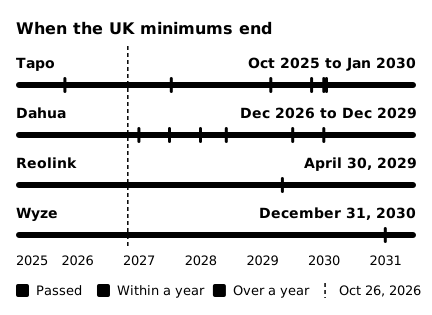
- TP-Link: its UK statement gives a date for 99 Tapo camera rows. 90 rows give dates from February 2029 to January 2030. The other nine are older versions and end by 2027. They include the C200 V1 to V3, C100 V2 and V4, and C210 V1 and V2.
- Reolink: all 11 of its UK statements give the same date, April 30, 2029. Of the 22 Reolink cameras safeuntil tracked on October 26, 21 are named in them.
- Dahua: its UK site gives a date for 469 IP camera rows. Dahua adds a generation suffix such as S2 or S3 to model names, and some rows leave it out. Look for the row that matches the full model name on your camera's label.
What a UK minimum promises
From April 29, 2024, UK law applies to makers that sell internet-connected products in the UK. A maker must publish the date until which it will at least provide security updates. Once the date is published, the maker can move it later but not earlier. A UK minimum is not the day updates end. It is the earliest day they can end.
The promise covers products sold in the UK. Reolink's statements say the date applies only to those. TP-Link says the versions it sells can differ by region. Still, apart from the Wyze Cam v1, these statements are the only per-model update dates the four makers put in writing.
 (open full-size image)
For older Tapo versions and some Dahua IP cameras, the UK minimum has passed or ends within a year. Eight of the nine older Tapo rows end on July 11, 2027, among them the C200 V1 to V3. The ninth, for the C110 V2, passed on October 18, 2025. For Dahua, 130 of the 469 rows end by June 30, 2027.
Match the hardware version
One model can have different dates for each hardware version. In TP-Link's UK statement, the UK minimum is July 11, 2027 for the Tapo C200 V3 and February 20, 2029 for the C200 V3.20. The two version names look almost the same, yet the dates differ by more than a year and a half. The hardware version is on the label under the camera and in the app (steps below).
TP-Link says Tapo firmware updates only through the Tapo app. So the app best shows which firmware your own camera can get.
With no date, check the newest firmware
If a camera has neither an end date nor a UK minimum, look at the date of its newest firmware on the maker's download page. If there has been no new firmware for more than 18 months, its updates may have ended.
 (open full-size image)
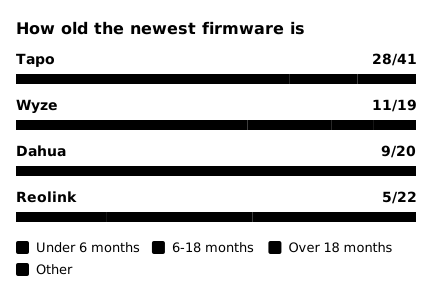
53 of the 102 cameras safeuntil tracked on October 26 had gotten new firmware in the previous 6 months. Among cameras with no end date, 23 had no new firmware for more than 18 months. At Reolink, that was 9 of 22. The two marked "Other" in the chart are the Wyze Cam v1, whose support ended, and the Wyze Cam Floodlight v1, which has no firmware date in safeuntil.
safeuntil marks a camera with no end date "Likely ended (estimate)" once more than 18 months pass with no new firmware. The 18 months is safeuntil's own rule, not a maker rule. When a UK statement names that exact model, safeuntil waits until the UK minimum ends. Tapo is the exception: the US pages that safeuntil reads use other version names (V3.6, V3.26) than the UK statement, so safeuntil does not use the UK dates for Tapo. The Reolink RLC-410 has had no new firmware since October 7, 2023, and Reolink's UK statements do not name it. So it shows "Likely ended (estimate)".
A long gap in firmware does not cancel a UK minimum. The Reolink RLC-510A has had no new firmware since December 16, 2024. But Reolink's UK statements name it, with a UK minimum of April 30, 2029. So safeuntil shows the RLC-510A as "No end date yet", not "Likely ended (estimate)". The gap may only mean there was nothing to fix.
How to check your camera's firmware version
- Wyze: in the Wyze app, tap your camera, then the Settings gear at the top right, then Device Info and Firmware Version. Wyze's help page says if you see no option to upgrade there, your firmware is already up to date.
- Tapo: in the Tapo app, tap your camera's card to open Live View. Tap the gear icon to open Camera Settings, then tap your camera model to see the hardware and firmware versions (TP-Link). To look for an update, open Device Settings and tap Firmware Update (TP-Link).
- Reolink: in the Reolink app, tap the gear icon, then Device Info, to see the hardware and firmware versions. To install a firmware file yourself, use the Reolink Client on a computer or, for cameras with a web interface, a browser.
Then compare your version with the newest firmware on the maker's download page.
Using a camera after its support ends
After support ends, the maker no longer fixes security problems found later. Wyze discourages use past the final date of support and says it is entirely at the user's own risk. Before you replace a camera, open the app's firmware update screen once more. The maker may have released a last update before support ended, one your camera never installed. When you buy a camera, new or used, look up the end date or UK minimum for its exact hardware version.
FAQ
Does a camera stop working when its support ends? Not necessarily. Wyze said owners could still use the Cam v1 after February 1, 2022. TP-Link's policy says that after updates end, a product may work only on a local network or stop working entirely.
Sources
- UK legislation, The Product Security and Telecommunications Infrastructure (Security Requirements for Relevant Connectable Products) Regulations 2023, regulation 2 and Schedule 1: https://www.legislation.gov.uk/uksi/2023/1007/regulation/2/made, https://www.legislation.gov.uk/uksi/2023/1007/schedule/1/made
- TP-Link, End-of-Life Policy: https://privacy.tp-link.com/web/website/policy
- TP-Link, PSTI Statement of Compliance (UK) and Statements of PSTI Compliance (PDF, signed September 7, 2026): https://www.tp-link.com/uk/support/psti/, https://static.tp-link.com/upload/manual/2026/202609/20260907/Statements%20of%20PSTI%20Compliance_TP-Link.pdf
- TP-Link, How to find the hardware and firmware version of my TP-Link device, and How to Update Tapo and Kasa Device Firmware via the Tapo App (updated September 29, 2026): https://www.tapo.com/en/faq/359/, https://www.tapo.com/en/faq/21/
- Reolink, Product Statements of Compliance (UK PSTI, statements dated May 18, 2026): https://reolink.com/product-compliance-psti/
- Reolink, How to Find out Reolink Device System Information, and How to Manually Update Firmware for Reolink Devices: https://support.reolink.com/articles/360011977034-How-to-Find-out-Reolink-Device-System-Information/, https://support.reolink.com/articles/34817575507481-How-to-Manually-Update-Firmware-for-Reolink-Devices/
- Wyze, End-of-Life Policy (effective October 26, 2021): https://www.wyze.com/pages/end-of-life-policy
- Wyze, PSTI Information for EU and the UK: https://www.wyze.com/en-uk/pages/psti
- Wyze, How do I update my Wyze Cam firmware?: https://support.wyze.com/hc/en-us/articles/360042929211-How-do-I-update-my-Wyze-Cam-firmware
- Wyze Forum, V1 is now EOL (January 26, 2022, UTC): https://forums.wyze.com/t/v1-is-now-eol/214291
- Dahua, Product End-of-Life Policy, UK (last modified October 27, 2025): https://www.dahuasecurity.com/uk/newsEvents/productUsePolicy