ASUS Firmware: What 3.0.0.4.386, 3.0.0.4.388 and 3.0.0.6.102 Say About Router Updates
TL;DR
- The start of an ASUS firmware number, such as 3.0.0.4.388 or 3.0.0.6.102, is the firmware line; the digits after the underscore are the build.
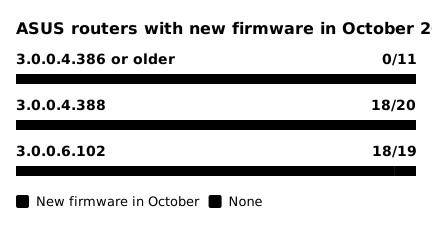
- In October 2026, ASUS posted new firmware for 36 of the 39 routers on 3.0.0.4.388 or 3.0.0.6.102 that safeuntil tracks, and for none of the 11 on 3.0.0.4.386 or older.
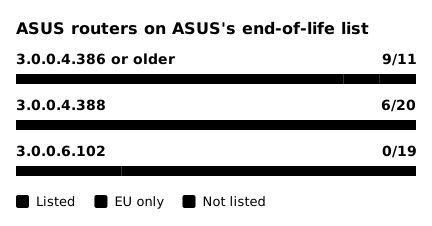
- 9 of those 11 older-line routers are on ASUS's end-of-life list with no region note, against 6 of 20 on 388 and none of 19 on 3.0.0.6.102.
- Your version is under Administration, Firmware Upgrade; compare it with the newest one on your model's ASUS download page.
The start of an ASUS router's firmware number shows which firmware line the router is on. In October 2026, ASUS posted new firmware for 36 of the 39 routers on 3.0.0.4.388 or 3.0.0.6.102 that safeuntil tracks, and for none of the 11 on 3.0.0.4.386 or older. The meaning of each part comes from the versions and dates on ASUS's firmware pages, not from an ASUS explanation. The counts come from the firmware pages of the 50 ASUS routers that safeuntil tracks, as the pages stood on October 29, 2026.
How to read an ASUS firmware number
Take 3.0.0.6.102_39447, the newest firmware for the RT-BE82U. The part before the underscore, 3.0.0.6.102, is the firmware line. The part after it, 39447, is the build. On ASUS's pages, each new firmware for a model has a new build. The line stays the same until ASUS moves the model to a newer line.
| Firmware line | ASUS routers safeuntil tracks | Which routers |
|---|---|---|
| 3.0.0.4.386 or older | 11 | Wi-Fi 5 routers (RT-AC series) and three Wi-Fi 6 routers (RT-AX55, RT-AX56U, RT-AX57) |
| 3.0.0.4.388 | 20 | Most Wi-Fi 6 and 6E routers (RT-AX, TUF Gaming AX, ZenWiFi, ROG Rapture GT-AX11000) |
| 3.0.0.6.102 | 19 | Wi-Fi 7 routers (RT-BE, TUF Gaming BE, ZenWiFi BD4 and BT8, ROG Rapture GT-BE98), plus the RT-AX86U Pro, RT-AX88U Pro and ROG Rapture GT-AX6000 |
A model can move to a newer line. The RT-AX88U went from 3.0.0.4.384 to 386 and then to 388. All 8 Wi-Fi 5 RT-AC routers stayed on 386 or an older line.
Compare build numbers only within one model and one hardware version. The RT-BE58U comes in two hardware versions, A1 and V2, that share one download page. ASUS posted build 40338 for the A1 on October 12, 2026, and build 39536 for the V2 on October 21. The later firmware, for the V2, has the lower number. ASUS notes which hardware version each file is for. The hardware version is on the product label or the box label.
Which firmware lines still get updates
 (open full-size image)
On the 386 line, the newest firmware of each router came out between February 26, 2025 (RT-AC3100) and September 4, 2026 (RT-AX55 and RT-AX57). The RT-AC87U, on 382, last got firmware on May 18, 2021. On 388, two routers got nothing in October. The RT-AX89X got its last firmware on October 31, 2025, and the notes say the model reached end of life. The RT-AX82U page lists January 15, 2026 as its newest firmware. ASUS had posted an October 22 build and later removed it. On 3.0.0.6.102, the A1 version of the TUF Gaming BE3600 got its newest firmware on September 18, 2026.
If your router's firmware starts with 3.0.0.4.386 or an older line (385, 384, 382), check whether ASUS has listed your model as end of life.
Is your model on ASUS's end-of-life list?
ASUS's End-of-Life Product List says that the models on it are no longer manufactured or updated with firmware and documentation. Some entries end in "(only EU)", and ASUS notes that end-of-life status can differ by region.
 (open full-size image)
9 of the 11 routers on 386 or older are on the list with no region note, against 6 of 20 on 388 and none of 19 on 3.0.0.6.102. Another 16 routers appear only with "(only EU)": 1 on 386, 10 on 388 and 5 on 3.0.0.6.102.
Being on the list did not stop every update. On October 22, 2026, ASUS posted new firmware for five listed 388 routers: the RT-AX86U, RT-AX86S, RT-AX88U, RT-AX92U and RT-AXE7800. The notes say it fixes a problem that could cut internet access when DNSSEC, a DNS security setting, is on. For the RT-AX88U, the notes of the April 17, 2026 firmware had already said that the model reached end of life and that its firmware would no longer be updated. Install the October firmware if you have one of these five. ASUS's list still says that these models get no more firmware, so do not plan on another one.
How to check your router
- Open a browser on a device connected to the router, go to www.asusrouter.com (or the router's IP address) and sign in.
- The firmware version that the router runs is at the top of the page. Click it to open Administration → Firmware Upgrade.
- On ASUS support, search for your model, open Driver & Tools → BIOS & FIRMWARE and compare your version with the newest one there. If the model has two hardware versions, read the notes to find the file for yours.
- If a newer version exists, install it from the same Firmware Upgrade page.
If your number starts with 3.0.0.4.386 or an older line and your model is on ASUS's end-of-life list, plan to replace the router. The safeuntil page of each tracked model shows whether its updates have ended, for example the RT-AC68U.
FAQ
Can I move my router to a newer firmware line myself? No. Each ASUS firmware file names the models it is for, and the hardware version where a model has two. Install only a file from your own model's download page whose notes match your hardware version.
Sources
Dates are as ASUS's firmware pages show them (year/month/day, with no time zone).
- ASUS, End-of-Life Product List: https://www.asus.com/event/network/eol-product/
- ASUS, firmware pages of the routers named in this post, for example the RT-AX88U, RT-AX92U and RT-BE58U: https://www.asus.com/us/supportonly/rt-ax88u/helpdesk_bios/, https://www.asus.com/us/supportonly/rt-ax92u/helpdesk_bios/, https://www.asus.com/us/supportonly/rt-be58u/helpdesk_bios/
- ASUS, [Wireless Router] How to update the firmware of your router to the latest version (updated February 23, 2026): https://www.asus.com/support/faq/1008000/
- ASUS, How to manually upgrade firmware for an ASUS router or range extender: https://www.asus.com/support/faq/1010600/